
Persistence
Use sharedPreferences
Definition
Shared Preferences provide a simple way to store key-value pairs persistently.
Shared preference is an API that will store un an XML file simple data types like int, double, bool, String and StringList or json encoded objects.
Dependency declaration
flutter pub add shared_preferences
Save data
// Load and obtain the shared preferences for this app.
final prefs = await SharedPreferences.getInstance();

// Save the counter value to persistent storage under the 'counter' key.
await prefs.setInt('counter', counter);
Read data
final prefs = await SharedPreferences.getInstance();

// Try reading the counter value from persistent storage.
// If not present, null is returned, so default to 0.
final counter = prefs.getInt('counter') ?? 0;
🧪 Exercise
Exercise 1 - Use shared preferences to store quiz data and timestamp of last successful API fetch.
Use SharedPreferences to
- Store the json quiz data fetched from the API on a String key "quiz_data".
- Store an integer value containing the timestamp of the last successful API fetch.
- On app launch, check if there is quiz data stored in SharedPreferences than is less than 5 minutes old.
- if yes, load the quiz data from SharedPreferences
- if no, fetch the quiz data from the API, store it in SharedPreferences along with the new timestamp.
Complete Solution
Expand
- Check it on Zapp : https://zapp.run/edit/flutter-zhhc06v0hhd0
- or download the project code here 💾
Use database
SQLite is a powerful and lightweight relational database that's commonly used for data storage in Flutter apps.
Why use SQLite?
On mobile development, SQLite is a popular choice for local data storage due to its efficiency and ease of use. It is mainly used for offline data storage, caching, and managing structured data.
There is multiple packages to use SQLite in Flutter from low-level to high-level abstractions. The most popular ones are sqflite and drift. Sqflite is a low-level package that provides direct access to SQLite databases, while drift is a higher-level package that offers an ORM-like experience with type safety and reactive programming features. Sqflite supports both Android and iOS platforms, while drift supports Android, iOS, and web platforms. The choice between the two depends on your specific needs and preferences for database management in your Flutter app.
support
sqlflite is not supported on web platform.
Dependency declaration
flutter pub add sqflite
or add to the pubspec.yaml file
dependencies:
  sqflite: ^2.0.0+4
Creating SQLite databases.
import 'package:sqflite/sqflite.dart';

// Open the database and store the reference.
final database = openDatabase(
   // Set the path to the database.
   join(await getDatabasesPath(), 'quiz_database.db'),
   // When the database is first created, create a table to store quizzes.
   onCreate: (db, version) {
       return db.execute(
             'CREATE TABLE quizzes(id INTEGER PRIMARY KEY, question TEXT, answer TEXT)',
          );
   },
   // Set the version. This executes the onCreate function and provides a
   // path to perform database upgrades and downgrades.
   version: 1,
);
Performing CRUD
CRUD operations (Create, Read, Update, Delete) are fundamental for managing data in a database. Here are examples of how to perform CRUD operations using the sqflite package in Flutter.
Insert data
Future<void> insertQuiz(Quiz quiz) async {
   // Get a reference to the database.
   final db = await database;
   // Insert the Quiz into the correct table. Also specify the
   // `conflictAlgorithm`. In this case, if the same quiz is inserted
   // multiple times, it replaces the previous data.
   await db.insert(
         'quizzes',
         quiz.toMap(),
         conflictAlgorithm: ConflictAlgorithm.replace,
   );
}
Read data
Future<List<Quiz>> quizzes() async {
   // Get a reference to the database.
   final db = await database;
   // Query the table for all The Quizzes.
   final List<Map<String, dynamic>> maps = await db.query('quizzes');
   // Convert the List<Map<String, dynamic> into a List<Quiz>.
   return List.generate(maps.length, (i) {
         return Quiz(
               id: maps[i]['id'],
               question: maps[i]['question'],
               answer: maps[i]['answer'],
         );
   });
}
Update data
Future<void> updateQuiz(Quiz quiz) async {
   // Get a reference to the database.
   final db = await database;
   // Update the given Quiz.
   await db.update(
         'quizzes',
         quiz.toMap(),
         // Ensure that the Quiz has a matching id.
         where: 'id = ?',
         // Pass the Quiz's id as a whereArg to prevent SQL injection.
         whereArgs: [quiz.id],
   );
}
Delete data
Future<void> deleteQuiz(int id) async {
   // Get a reference to the database.
   final db = await database;
   // Remove the Quiz from the database.
   await db.delete(
         'quizzes',
         // Use a `where` clause to delete a specific quiz.
         where: 'id = ?',
         // Pass the Quiz's id as a whereArg to prevent SQL injection.
         whereArgs: [id],
   );
}
Prepare the data model
Because sqflite queries return a List<Map<String, dynamic>>, it's common to create a data model class that represents the structure of the data and provides methods for converting between the database format and the Dart object format. This makes it easier to work with the data in your application. Here is an example of a complex data type with sub-mapping.
class Question {
  final String text;
  final List<Answer> answers;
   Question({required this.text, required this.answers});
   Map<String, dynamic> toMap() {
       return {
             'text': text,
             //  answers need to be converted to map
               'answers': answers.map((answer) => answer.toMap()).toList(),
       };
   }
Transactions
You can also perform transactions to execute multiple operations atomically, ensuring data integrity and consistency. Transactions allow you to group multiple database operations together, and if any operation fails, the entire transaction can be rolled back to maintain a consistent state.
here is an example of using transactions to insert a quiz and its associated answers atomically:
Future<void> insertQuizWithAnswers(Quiz quiz) async {
   final db = await database;
   await db.transaction((txn) async {
         // Insert the quiz and get its generated id
         int quizId = await txn.insert('quizzes', quiz.toMap());
         // Insert each answer associated with the quiz
         for (var answer in quiz.answers) {
               await txn.insert('answers', {
                     'quiz_id': quizId, // Foreign key to associate with the quiz
                     'text': answer.text,
                     'is_correct': answer.isCorrect ? 1 : 0,
               });
         }
   });
}
🧪 Exercise
Step 1 - Sqflite dependency declaration
Declare the dependency for sqflite in your pubspec.yaml file and run flutter pub get to install it.
Step 2 - Database initialization
Initialize the database by creating the necessary tables and setting up the schema.
Implement the following database schema to store quiz questions and answers: 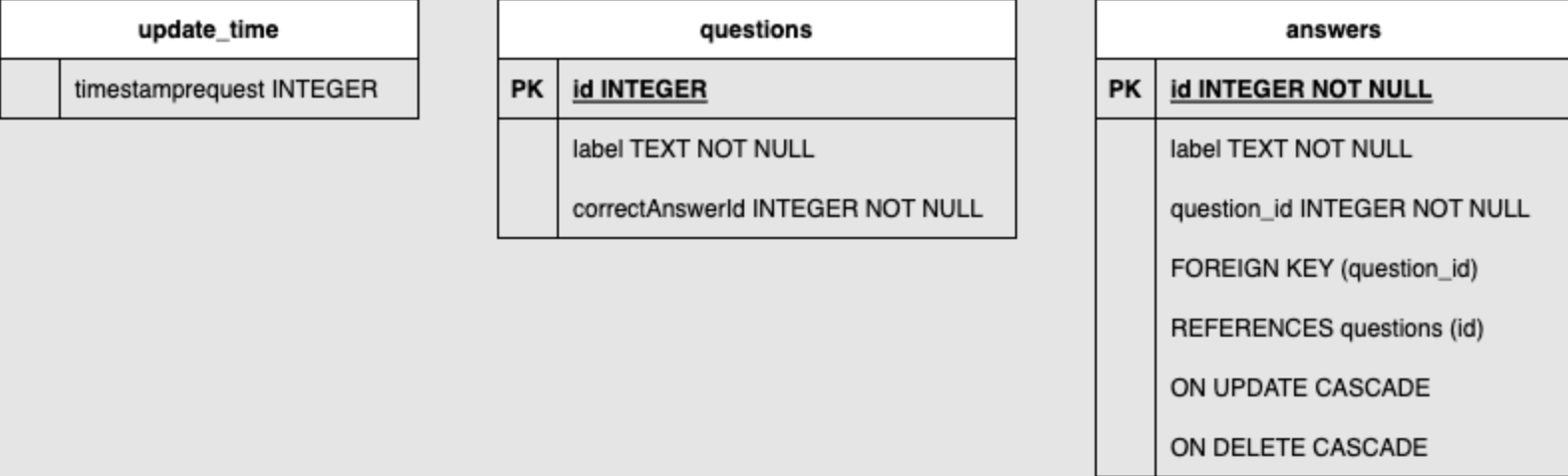
To not overcomplicate the exercise, please find below a sample code snippet for database initialization with the above schema. You can modify it as needed.
Database initialization
Database? _database;

  Future<Database> get database async {
    if (_database != null) return _database!;
    _database = await _initDatabase();
    return _database!;
  }

  Future<Database> _initDatabase() async {
    final path = await getDatabasesPath();
    final dbPath = join(path, 'quiz.db');

    return await openDatabase(
      dbPath,
      version: 1,
      onCreate: (db, version) async {
        await db.execute('''
          CREATE TABLE questions (
            id INTEGER PRIMARY KEY,
            label TEXT NOT NULL,
            correct_answer_id INTEGER NOT NULL
          )
        ''');
        await db.execute('''
          CREATE TABLE answers (
            id INTEGER,
            label TEXT NOT NULL,
            question_id INTEGER NOT NULL,
            PRIMARY KEY (id, question_id),
            FOREIGN KEY (question_id) REFERENCES questions (id) ON DELETE CASCADE
          )
        ''');
      },
    );
  }
Step 3 - Evolve the data model to support database storage conversion
Create methods for converting between the database Map format and Dart objects for the quiz questions and answers. This will make it easier to work with the data in your application.
Step 4 - CRUD functions implementation
Implement functions to perform Create, Read, Update, and Delete (CRUD) operations on the quiz questions and answers in the database. This will allow you to manage the quiz data effectively.
Step 5 - Use the database & Implement data caching strategy
- First app launch with network:
- Make an API request and store in the database.
- First app launch without network:
- Generate a mock list of questions.
- App launch without network:
- Return data from the database even if it's old data. App launch with network, with the last request within 5 minutes:
- Return data from the database.
- App launch with network, with the last request over 5 minutes ago:
- Make an API request, return the data, and store in the database, store also the timestamp of the last successful request.
Complete solution
Expand
- Check it on Zapp : https://zapp.run/edit/flutter-z0sk06bg0sl0
- or download the project code here 💾
File I/O
File I/O allows you to read and write files on the device's file system. This can be useful for storing larger amounts of data or for working with files that need to be accessed outside of the app.
import 'dart:io';
import 'package:path_provider/path_provider.dart';

Future<String> get _localPath async {
   final directory = await getApplicationDocumentsDirectory();
   return directory.path;
}

Future<File> get _localFile async {
   final path = await _localPath;
   return File('$path/quiz_data.txt');
}

Future<File> writeQuizData(String data) async {
   final file = await _localFile;
   return file.writeAsString(data);
}

Future<String> readQuizData() async {
   try {
         final file = await _localFile;
         String contents = await file.readAsString();
         return contents;
   } catch (e) {
         return 'Error: $e';
   }
}